
Ctrl+Enter for ChatGPT – Send Messages Effortlessly
Overview
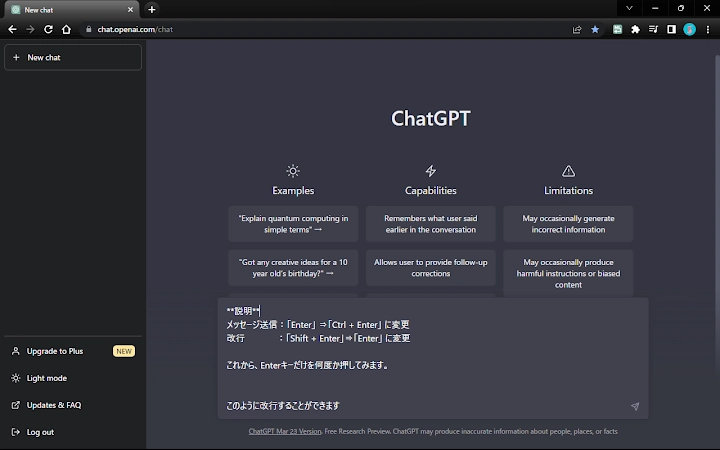
The ChatGPT Ctrl+Enter Sender is a lightweight browser extension designed to enhance messaging efficiency on AI-powered platforms. Its primary function is to restore the traditional behavior of the Enter key—allowing users to insert line breaks—while reserving Ctrl+Enter for sending messages. This simple yet effective solution addresses a common frustration experienced by frequent users of ChatGPT, Poe, Phind, Bard, and other AI chat interfaces.
By enabling this extension, users can type multi-line responses without the risk of accidental message submission. This is particularly beneficial for professionals, students, and content creators who rely on precise text formatting during extended conversations. The tool is ideal for anyone who has struggled with the default Enter key behavior that sends messages immediately, disrupting workflow and requiring constant backtracking.
Developed by Masachika Kamada, the extension reflects a focused approach to user experience optimization. It operates silently in the background and integrates directly with supported websites, requiring no configuration or complex setup. The developer has made the tool freely available, encouraging community feedback through a public GitHub repository for issue reporting and feature suggestions.
Key Features & Capabilities
- Enter Key Line Break Functionality – Pressing Enter now inserts a new line instead of sending the message, improving typing accuracy and reducing errors.
- Ctrl+Enter for Message Sending – The original keyboard shortcut is preserved for sending messages, ensuring a familiar and efficient workflow.
- Toggle Switch for Instant Activation – A simple icon in the browser toolbar allows users to enable or disable the extension on demand.
- Multi-Platform Support – Works seamlessly on ChatGPT, Poe, Phind, Bard, ChatPDF, and Perplexity AI without requiring separate configurations.
- Lightweight and Fast – With a file size of just 1.2 MB, the extension loads quickly and consumes minimal system resources.
These features are especially useful in real-world scenarios such as drafting detailed responses, writing code snippets, or structuring complex queries. Users can compose content with full formatting control before sending, minimizing the need to edit or retype messages. The toggle switch adds flexibility, allowing users to disable the extension temporarily when working on platforms where the default behavior is preferred.
User Interface, Workflow & Performance
The extension features a minimalistic interface centered around a single toggle icon in the browser’s toolbar. The design prioritizes simplicity and accessibility, ensuring that users can activate or deactivate the tool with a single click. Navigation is intuitive, with no additional menus or settings required.
Workflow integration is seamless. Once installed, the extension begins functioning immediately on supported websites. There is no need for manual configuration or login steps. The behavior is consistent across all compatible platforms, providing a uniform experience regardless of the AI service being used.
Performance details were not specified by the developer. However, given the extension’s small size and focused functionality, it is expected to operate efficiently without impacting browser speed or stability. The developer did not provide additional system requirements or resource usage data. General software behavior patterns suggest low CPU and RAM consumption, typical of lightweight browser extensions.
Compatibility & System Requirements
The ChatGPT Ctrl+Enter Sender is compatible with Windows and Mac operating systems. It supports major desktop browsers, though specific browser versions were not listed. The installation size is 1.2 MB, which is minimal and suitable for most users.
Exact system requirements were not listed. Compatibility information was partially provided, indicating support for popular AI chat platforms. The extension does not require administrative privileges or additional software to function. Users should ensure their browser is up to date to maintain optimal performance and security.
Pros and Cons
Pros
- Restores natural Enter key behavior for line breaks
- Preserves Ctrl+Enter for message sending
- Simple toggle switch for quick activation
- Works across multiple AI platforms without reconfiguration
- Free to use with no hidden costs
- Lightweight and fast, minimal resource usage
Cons
- Only available as a browser extension, not a standalone desktop app
- Does not support all web platforms beyond the listed ones
- No advanced customization options for keyboard shortcuts
- Developer did not provide detailed performance metrics
- Requires a GitHub account to report issues
FAQ Section
Is the extension compatible with all AI chat platforms?
The extension works on specific websites including ChatGPT, Poe, Phind, Bard, ChatPDF, and Perplexity AI. Compatibility with other platforms is not guaranteed and may require additional configuration or support.
Is the extension safe to use?
Yes, the extension is open-source and available through official browser stores. It does not collect personal data or track user behavior. All code is publicly available on GitHub for review.
How do I update the extension?
Updates are automatically managed by the browser’s extension store. Users will receive notifications when a new version is available.
Can I use this extension offline?
The extension functions only when connected to the internet and requires access to the supported websites to operate. It cannot be used in fully offline environments.
What license type does the extension use?
The extension is distributed under an open-source license. Users are free to view, modify, and redistribute the code as permitted by the repository’s license terms.
Final Thoughts + CTA
The ChatGPT Ctrl+Enter Sender delivers a focused, effective solution to a widespread usability issue. Its simplicity, compatibility with multiple AI platforms, and zero cost make it a valuable addition for anyone who interacts regularly with AI chat interfaces. While it lacks advanced customization, its core functionality is executed flawlessly.
Professionals, students, and content creators who value typing accuracy and workflow efficiency will benefit most from this tool. It eliminates the frustration of accidental message sends and enhances productivity through intuitive keyboard behavior.
Download the ChatGPT Ctrl+Enter Sender now and experience smoother, more accurate conversations with your favorite AI tools.







